Project
-
Project Management
-
Coordinate Systems
4.1 Project Management
Click Project menu, click [Open] button, select the .tgo2 project file in the local path to open. If a project is currently opened, close the current project first then open another project.
Click Project menu, click [Save] button, to save currently opened project.
Click Project menu, click [New] button, to jump to new project interface.
Click Project menu, click [Export] button, select the local path to export currently opened project to another path.
Click Project menu, click [Information] button, open the project information dialog, displaying project name, creation time, modified time, company, surveyor, description and other information, of which the company, surveyor and description can be modified.
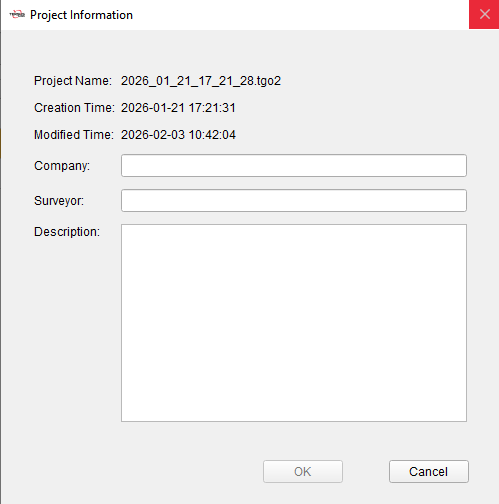
Figure 4.1 Project Information
4.2 Coordinate Systems
Click Project menu, click [Coordinates] button, open the coordinate system setting dialog, displaying coordinate system and parameters of the current project.
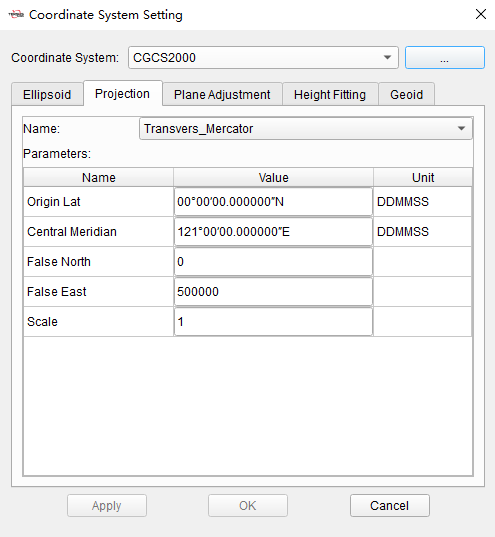
Figure 4.2 Coordinate System Parameters
| Coordinate System | |
|---|---|
| Ellipsoid | The local ellipsoid of of the current project, including ellipsoid and datum transformation. When editing ellipsoid parameters, you can select it from the drop-down list, and the parameters such as a and 1/f will be changed accordingly. The datum trans includes None, Three Parameters and Seven Parameters. In the current project, the ellipsoid and datum trans are used to realize the conversion calculation of Lat/Lon/Hgt coordinates under WGS84 and local system. |
| Projection | The projection of the current project. Select projection type from the drop-down list, and enter parameters according to projection type, such as Origin Lat, Central Meridian, False North, False East, Scale and so on. In the current project, the projection is used to realize the conversion calculation of Lat/Lon coordinates and North/East coordinates under local system. |
| Plane Adjustment | The plane adjustment parameters of the current project. In the current project, the plane adjustment is used to realize the conversion calculation of projected North/East coordinates and known coordinates in site calibration. |
| Height Fitting | The height fitting parameters of the current project. In the current project, the height fitting is used to realize the conversion calculation of ellipsoidal height coordinates and known elevation coordinates in site calibration. |
| Geoid | The geoid model of the current project, supports *.gtx, *.ggf, *.isg formats. In the current project, the geoid model file selected is used to calculate elevation above mean sea level from ellipsoidal height. |