5. AR Stakeout
5.1 Introduction
AR stakeout for Tersus TS20 is an innovative integration of GNSS, IMU and the bottom camera. Different from AR stakeout methods that use the controller's camera, It can accurately calculate and mark the staking point directly on the live view. Guided by a clear, eye-catching directional arrow and real-time distance display, it achieves up to a 50% improvement in efficiency.
5.2 Start AR Stakeout
1) Connect TS20 via WiFi and start rover mode to get a fixed solution.
2) Turn on Tilt, input the correct pole height and finish the tilt initialization.
3) Enter Point Stakeout interface. Click  to show the Staking Point list and click [Import] to import targets from file, from other point lists or directly manually add.
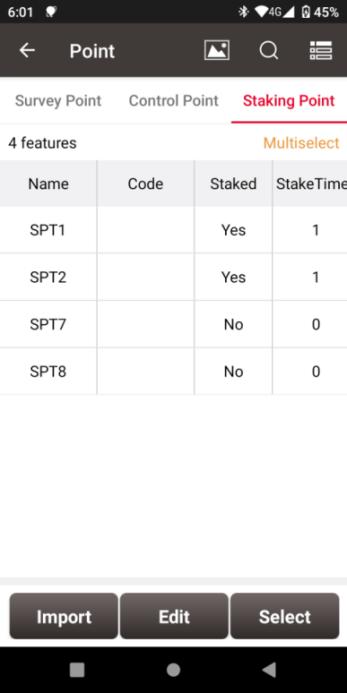
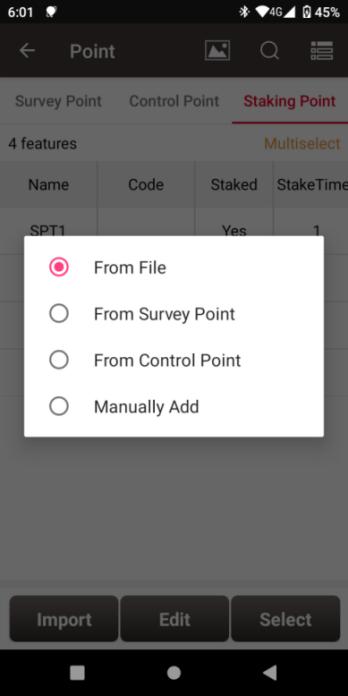
Figure 5.1 Staking Point List Figure 5.2 Import Targets
6) Select one of the point as the target, back to the Point Stakeout interface. Click  to open the bottom camera and enter AR staking interface.
5.3 Go to the Target
The target point will be calculated and displayed in the real scene as shown below. Nuwa also indicates the direction and distance from the current position to the target. Move toward the target until the pole tip aligns with the target to complete the AR stakeout.
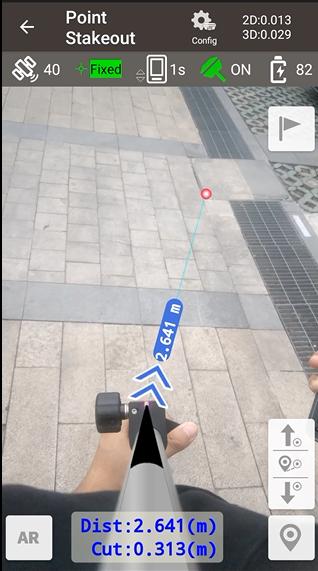
Target Point
Switch Targets
Direction and
Distance Indicator
Figure 5.3 AR Stakeout