Introduction
This user manual introduces how to use Tersus GNSS Center software.
1.1 Overview
The Tersus GNSS Center is configuration tool for Tersus GNSS products. This software integrates configuration, monitoring, data logging, firmware upgrade and other useful tools. With Tersus GNSS Center, you can communicate over the on-board serial ports, key in commands to configure the board, forward the NTRIP correction data received to the board, upgrade firmware, store data, playback data, convert data to RINEX format, display rover's trajectory in Google map, calculate the average position of the base station, view status of the board and positioning results.
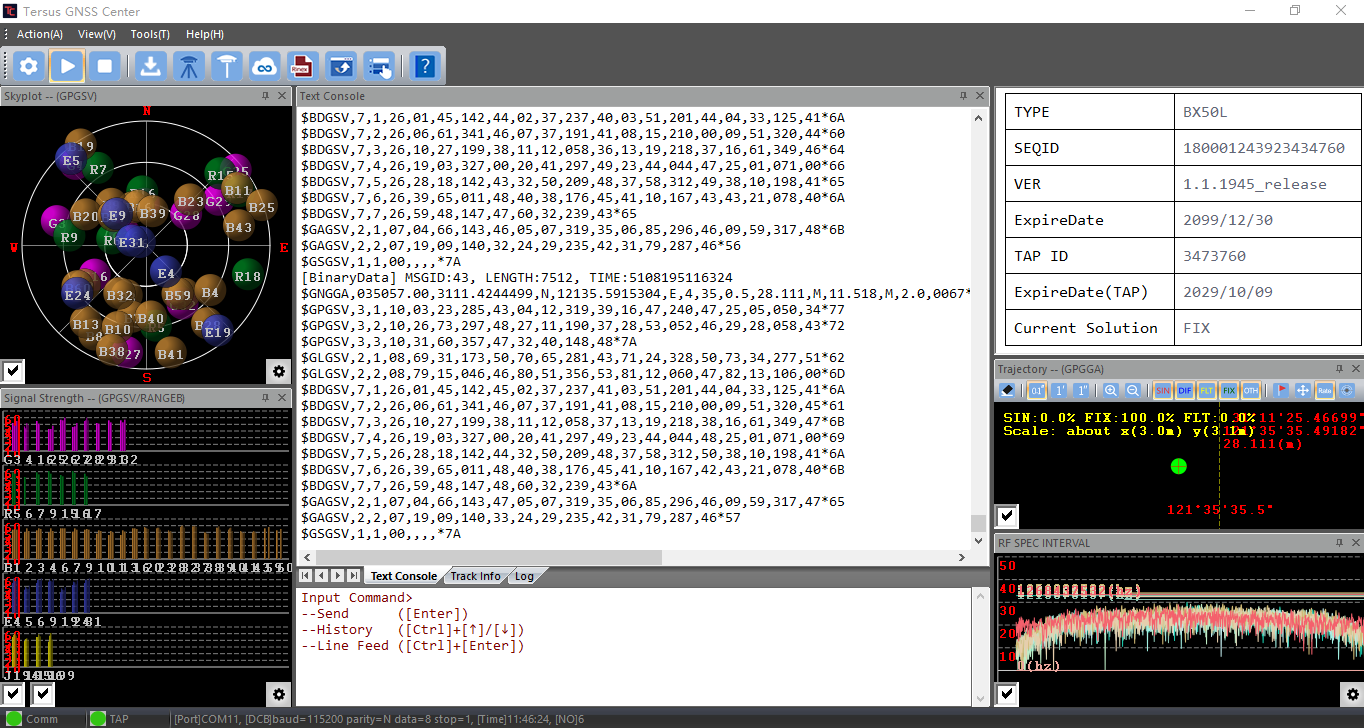
Figure 1.1[]{#_Toc2524 .anchor} Tersus GNSS Center main interface
1.2 Features
Tersus GNSS Center has following features:
-
Communicate over the on-board serial ports
-
Key in commands to configure the board
-
Forward the NTRIP correction data received to the board
-
Upgrade firmware
-
Store data, playback data
-
Convert data to RINEX format
-
Display the rover's trajectory in Google map
-
Calculate the average position of the base station
-
View status of the board and positioning results
1.3 System Requirements
Tersus GNSS Center is to run on a wide range of different computer configurations. The systems requirements are listed as below:
Table 1[]{#_Toc31483 .anchor} System Requirements for Tersus GNSS Center
| Operating System | Microsoft Windows 7, 8, 10 (32-bit and 64-bit) | |
|---|---|---|
| Hardware | Minimum | Recommended |
| Processor | Intel Core i3 | Intel Core i5 |
| RAM | 4GB | 8GB |
| Hard disk | 10GB | 1TB |
| Graphics card | Direct X9 compatible integrated graphics | Direct X9 compatible 2GB discrete graphics |
| Internet Connection | Ability to originate both http and https (SSL) connections |